 xLiveWallpaper
Zootopia 2 Night Trio Adventure Live Wallpaper
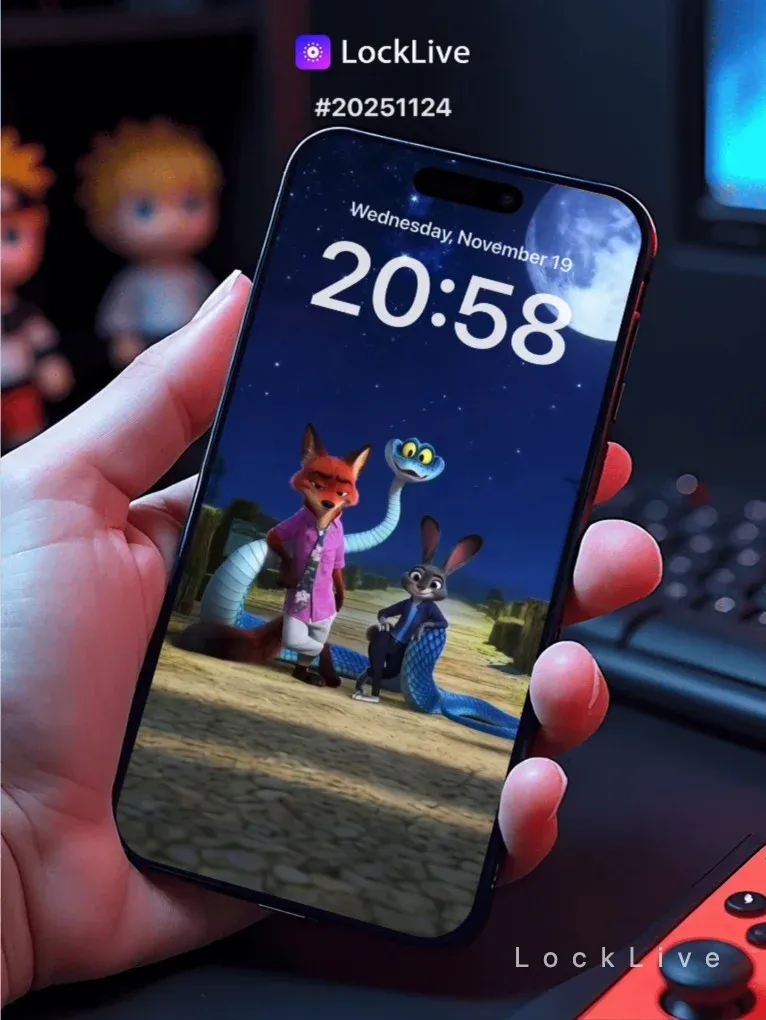
No.20251124 動物方城市2夜遊三俠動態壁紙
🌃尼克、朱迪同芬尼克三俠夜晚喺動物方城市探險🌉,穿梭喺霓虹燈光嘅街道之間🚦,背景有地鐵喺高架軌道駛過🚇,三個身影喺夜色中顯得又型又醒目✨
🖼️城市夜景霓虹燈不停閃爍|地鐵列車帶住光影高速駛過|三個角色喺街道上靈活走動|朱迪對耳仔隨住腳步微微彈動|遠處大廈燈光逐層亮起同熄滅
現在您可以以早鳥價加入我們的動態桌布俱樂部,同時支援 Android 影片與 iOS 實況照片格式。
https://locklive.gumroad.com/l/vip
iPhone用戶在xLiveWallpaper App中搜尋「20251124」
AppStore下載:https://apps.apple.com/app/apple-store/id6747997192?pt=611621&ct=xlivewallpaper&mt=8
#動態壁紙 #LockLive #實況全能王 #LiveWallpaper #xLiveWallpaper #動物方城市2 #夜遊三俠 #尼克 #朱迪 #芬尼克 #城市夜景 #霓虹燈光 #探險時刻
No.20251124 Zootopia 2 Night Trio Adventure Live Wallpaper
🌃Nick, Judy, and Finnick venture through the neon-lit streets of Zootopia at night🌉, weaving between glowing signs and bustling avenues🚦, with a metro train whooshing by on elevated tracks in the background🚇, their silhouettes cutting sharp and cool against the city lights✨
🖼️Neon signs flicker rhythmically across the cityscape|Metro train speeds past leaving light trails|Trio moves dynamically through the streets|Judy’s ears bounce with each step|Skyscraper lights turn on and off in patterns in the distance
You can now join our live wallpaper club at early-bird price, supporting both Android video and iOS Live Photo formats.
https://locklive.gumroad.com/l/vip
iPhone users search ‘20251124’ in xLiveWallpaper App
Download:https://apps.apple.com/app/apple-store/id6747997192?pt=611621&ct=xlivewallpaper&mt=8
#LiveWallpaper #LockLive #xLiveWallpaper #Zootopia2 #NightAdventure #NickWilde #JudyHopps #Finnick #NeonNoir #CityLights #UrbanExploration #DisneyAnimation
No.20251124 ズートピア2 夜の三侠冒険 動画壁紙
🌃ニック、ジュディ、フィニックの3人がズートピアの夜の街を探検🌉、ネオンサインが輝く路地を駆け抜け🚦、背景には高架を走るメトロが流れる🚇、街明かりに浮かぶ彼らの姿がかっこよく映える✨
🖼️ネオンサインが街中でリズムに合わせて点滅|メトロが光の軌跡を残しながら疾走する|3人が街路を活発に動き回る|ジュディの耳が歩くたびにぴょこんと跳ねる|遠くのビルの照明がパターンで点いたり消えたり
今なら早期割引価格でライブ壁紙クラブにご参加いただけます。Android ビデオと iOS ライブフォトの両フォーマットに対応しています。
https://locklive.gumroad.com/l/vip
iPhoneユーザーはxLiveWallpaperアプリで「20251124」を検索
ダウンロード::https://apps.apple.com/app/apple-store/id6747997192?pt=611621&ct=xlivewallpaper&mt=8
#動画壁紙 #LockLive #xLiveWallpaper #ライブ壁紙 #ズートピア2 #夜の冒険 #ニックワイルド #ジュディホップス #フィニック #ネオンノワール #都市夜景 #探検 #ディズニー
No.20251124 动物方城市2夜遊三俠动态壁纸
🌃尼克、朱迪与芬尼克三侠夜晚在动物方城市探险🌉,穿梭于霓虹灯光的街道之间🚦,背景有地铁在高架轨道驶过🚇,三个身影在夜色中显得又酷又醒目✨
🖼️城市夜景霓虹灯不断闪烁|地铁列车带着光影高速驶过|三个角色在街道上灵活走动|朱迪的耳朵随着脚步微微弹动|远处大厦灯光逐层亮起与熄灭
现在您可以以早鸟价加入我们的动态壁纸俱乐部,同时支持 Android 视频与 iOS 实况照片格式。
https://locklive.gumroad.com/l/vip
iPhone用户在xLiveWallpaper App中搜索「20251124」
AppStore下载:https://apps.apple.com/app/apple-store/id6747997192?pt=611621&ct=xlivewallpaper&mt=8
#动态壁纸 #LockLive #实况全能王 #LiveWallpaper #xLiveWallpaper #动物方城市2 #夜遊三俠 #尼克 #朱迪 #芬尼克 #城市夜景 #霓虹灯光 #探险时刻
安卓與iPhone動態桌布設定速成指南
下載準備
在本網站選擇喜愛的動態桌布後:
- 安卓用戶:下載MP4格式影片檔
- iPhone用戶:下載Live Photo實況格式
安卓設定步驟(影片檔)
- 下載完成後,進入手機「檔案管理」
- 找到下載的影片檔,長按選擇「設為桌布」
- 或使用第三方應用:安裝「壁纸引擎」「Android版 Wallpaper Engine」應用程式,從應用內選擇本網站下載的影片檔
- 調整設定:建議開啟循環播放,可選擇靜音節省耗電
- 套用完成:選擇設為主畫面或鎖定畫面
iPhone設定步驟(實況格式)
- 匯入檔案:透過 OneDrive 手机應用或 AirDrop 傳到iPhone
- 開啟「照片」應用:找到匯入的實況照片
- 點擊分享圖示 → 選擇「用作背景圖片」
- 調整位置後點擊「設定」
- 重要:進入「設定」>「背景圖片」,確認「原況照片」選項已開啟
- 鎖定畫面下重壓螢幕即可看到動態效果
效能提示
- 安卓旗艦機型可選4K畫質,舊機型建議使用1080p
- iPhone機型仅支援使用1080p
- iPhone機型仅支援使用1-2秒
- iPhone低電量時建議暫停使用動態桌布
- 深色系桌布較節省電力(特別適合OLED螢幕)
本網站特色
- 每週更新獨家動態桌布
- 提供雙平台專用格式
- 檔案已優化,兼顧品質與效能
立即下載,讓您的手機主畫面與眾不同!
Quick Guide to Setting Live Wallpapers on Android & iPhone
Download Preparation
After selecting your favorite live wallpaper on this website:
- Android Users: Download the video file in MP4 format
- iPhone Users: Download the file in Live Photo format
Android Setup Steps (Video File)
- After downloading, open the File Manager on your phone
- Locate the downloaded video file, long-press it and select Set as Wallpaper
- Or use a third-party app: Install applications like Wallpaper Engine or Wallpaper Engine for Android, then select the downloaded video file from within the app
- Adjust settings: It is recommended to enable loop playback, and you can choose to mute the audio to save battery power
- Once applied: Select to set it as the home screen wallpaper or lock screen wallpaper
iPhone Setup Steps (Live Photo Format)
- Import the file: Transfer it to your iPhone via the OneDrive mobile app or AirDrop
- Open the Photos app: Locate the imported Live Photo
- Tap the share icon → Select Use as Wallpaper
- Adjust the position and then tap Set
- Important Note: Go to Settings > Wallpaper and make sure the Live Photo option is enabled
- Press firmly on the screen when it is locked to see the live effect
Performance Tips
- Flagship Android models can support 4K resolution; for older models, 1080p is recommended
- iPhone models only support 1080p resolution
- iPhone models only support Live Photos of 1-2 seconds in length
- It is recommended to pause using live wallpapers when your iPhone is in low battery mode
- Dark-themed wallpapers are more power-efficient (especially suitable for OLED screens)
Website Features
- Exclusive live wallpapers updated weekly
- Specialized formats provided for both platforms
- Optimized files that balance quality and performance
Download now to make your phone's home screen stand out from the crowd!
Related Posts
- Doraemon Nobita in the Sky Live Wallpaper
- Doraemon Doraemon in the Sky Live Wallpaper
- Toy Story Open the Door Live Wallpaper
- A Record of Mortals Journey to Immortality Han Li Live Wallpaper
- Naruto Hinata Hyuga Dark Epic Style Leaf Guardian Live Wallpaper
- Naruto Kakashi Hatake Dark Epic Style Leaf Guardian Live Wallpaper
- Naruto Sakura Haruno Dark Epic Style Leaf Guardian Live Wallpaper
- Naruto Sasuke Uchiha Dark Epic Style Leaf Guardian Live Wallpaper
- Naruto Naruto Uzumaki Dark Epic Style Leaf Guardian Live Wallpaper
- Toy Story Andys Room Hidden Childhood Joy Live Wallpaper